


C 语言结构体 (struct) 完全指南
什么是结构体?
想象一下,你想描述一个学生,一个学生有姓名(字符串)、学号(整数)、年龄(整数)、成绩(浮点数)等多个不同类型的数据,如果用普通的变量来表示,你可能需要这样:
char name[50];
int id;
int age;
float score;
当学生数量增多时,这些变量就会变得零散,难以管理。结构体 就是为了解决这个问题而生的。
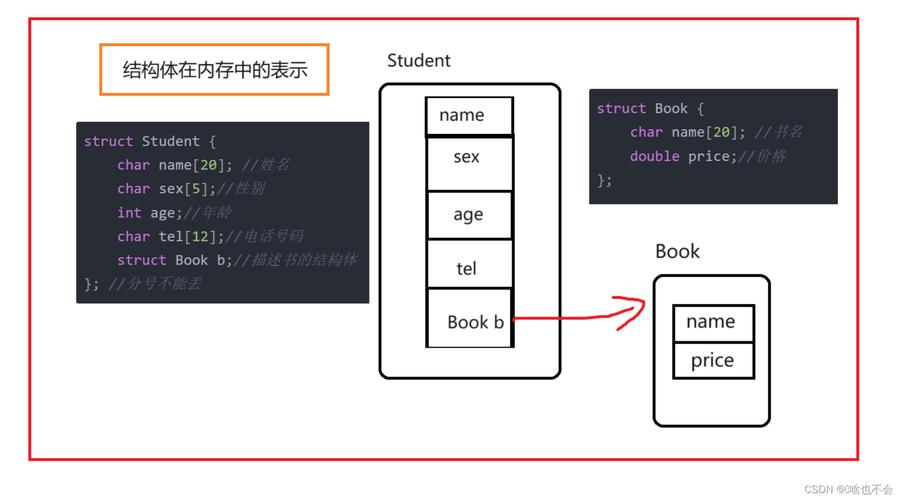
结构体 是一种用户自定义的数据类型,它允许你将不同类型的数据项组合成一个单一的类型,你可以把它看作是一个“容器”或“蓝图”,用来创建描述现实世界实体的数据结构。
如何定义和声明结构体?
定义结构体类型
使用 struct 关键字来定义一个新的数据类型,语法如下:
struct 结构体名 {
    数据类型 成员1;
    数据类型 成员2;
    ...
    数据类型 成员n;
};
示例:定义一个 Student 结构体

// 定义一个名为 Student 的结构体类型
struct Student {
    char name[50];  // 成员:姓名
    int id;         // 成员:学号
    int age;        // 成员:年龄
    float score;    // 成员:成绩
};
重要提示:
struct Student定义的是一个类型,就像int,char一样,它本身不占用内存。- 分号 在结构体定义的末尾是必须的,很容易忘记。
声明结构体变量
定义好类型后,我们就可以像使用基本数据类型一样声明变量了。
在定义结构体后直接声明
struct Student {
    char name[50];
    int id;
    int age;
    float score;
};
// 声明两个 Student 类型的变量 s1 和 s2
struct Student s1, s2;
在定义结构体的同时声明变量
struct Student {
    char name[50];
    int id;
    int age;
    float score;
} s1, s2; // 在这里直接声明变量
// 也可以同时定义类型和变量
struct Student {
    char name[50];
    int id;
    int age;
    float score;
} s1, s2;
// 甚至可以只定义变量,不定义类型(不推荐,代码可读性差)
struct {
    char name[50];
    int id;
    int age;
    float score;
} s3, s4;
如何访问和修改结构体成员?
我们使用成员访问运算符,也就是点号 来访问结构体变量的成员。
语法: 结构体变量名.成员名
示例:
#include <stdio.h>
#include <string.h>
// 定义 Student 结构体
struct Student {
    char name[50];
    int id;
    int age;
    float score;
};
int main() {
    // 声明并初始化一个结构体变量
    struct Student s1;
    // 访问并修改成员
    strcpy(s1.name, "张三"); // 字符串不能直接用 = 赋值,需要 strcpy
    s1.id = 1001;
    s1.age = 20;
    s1.score = 95.5;
    // 访问并打印成员
    printf("学生姓名: %s\n", s1.name);
    printf("学生学号: %d\n", s1.id);
    printf("学生年龄: %d\n", s1.age);
    printf("学生成绩: %.2f\n", s1.score);
    return 0;
}
结构体的初始化
你可以在声明结构体变量的同时对其进行初始化,就像初始化数组一样。
示例:
#include <stdio.h>
struct Student {
    char name[50];
    int id;
    int age;
    float score;
};
int main() {
    // 完全初始化
    struct Student s1 = {"李四", 1002, 21, 88.0};
    // 部分初始化(后面的成员会被自动初始化为0)
    // 注意:C99标准支持指定初始化器
    struct Student s2 = {.id = 1003, .score = 92.5}; // name和age会被初始化为0或空字符串
    printf("s1的信息: %s, %d, %d, %.2f\n", s1.name, s1.id, s1.age, s1.score);
    printf("s2的信息: %s, %d, %d, %.2f\n", s2.name, s2.id, s2.age, s2.score);
    return 0;
}
结构体数组
如果我们要存储多个学生的信息,使用结构体数组就非常方便。
示例:
#include <stdio.h>
struct Student {
    char name[50];
    int id;
    float score;
};
int main() {
    // 定义一个包含3个 Student 结构体的数组
    struct Student students[3] = {
        {"王五", 1001, 85.5},
        {"赵六", 1002, 92.0},
        {"钱七", 1003, 78.5}
    };
    // 遍历并打印数组中的每个学生信息
    for (int i = 0; i < 3; i++) {
        printf("学生 %d: 姓名=%s, 学号=%d, 成绩=%.2f\n",
               i + 1, students[i].name, students[i].id, students[i].score);
    }
    return 0;
}
结构体指针
使用指针来操作结构体非常高效,尤其是在函数传递结构体时,可以避免复制整个结构体带来的性能开销。
指向结构体的指针
struct Student *ptr_s;
如何通过指针访问成员?
有两种方式:
-
使用
->运算符(推荐):这是专门为结构体指针设计的,语法简洁。ptr_s->member等价于(*ptr_s).member
-
*使用 `
和.`**:先解引用指针,再用点号访问成员。
示例:
#include <stdio.h>
#include <string.h>
struct Student {
    char name[50];
    int id;
    float score;
};
int main() {
    struct Student s1 = {"孙八", 1004, 96.5};
    struct Student *ptr_s = &s1; // 指针 ptr_s 指向 s1
    // 使用 -> 访问成员
    printf("通过指针 -> 访问:\n");
    printf("姓名: %s\n", ptr_s->name);
    printf("学号: %d\n", ptr_s->id);
    printf("成绩: %.2f\n", ptr_s->score);
    // 使用 * 和 . 访问成员
    printf("\n通过指针 * 和 . 访问:\n");
    printf("姓名: %s\n", (*ptr_s).name);
    printf("学号: %d\n", (*ptr_s).id);
    printf("成绩: %.2f\n", (*ptr_s).score);
    return 0;
}
结构体作为函数参数
结构体可以作为函数的参数传递,主要有两种方式:
- 传值:将整个结构体复制一份传给函数,如果结构体很大,这种方式会消耗较多时间和内存。
- 传指针(传地址):只传递结构体的地址,函数内部通过指针操作原始结构体,效率高,且能修改原结构体的内容。这是更常用、更推荐的方式。
示例:
#include <stdio.h>
// 结构体定义
struct Point {
    int x;
    int y;
};
// 传值方式:函数内部修改不影响原结构体
void modifyByValue(struct Point p) {
    p.x = 100;
    p.y = 200;
    printf("函数内部 (传值): x = %d, y = %d\n", p.x, p.y);
}
// 传指针方式:函数内部修改直接影响原结构体
void modifyByPointer(struct Point *p) {
    p->x = 100;
    p->y = 200;
    printf("函数内部 (传指针): x = %d, y = %d\n", p->x, p->y);
}
int main() {
    struct Point p1 = {10, 20};
    struct Point p2 = {10, 20};
    printf("调用函数前 p1: x = %d, y = %d\n", p1.x, p1.y);
    modifyByValue(p1);
    printf("调用函数后 p1: x = %d, y = %d\n\n", p1.x, p1.y); // p1的值没有改变
    printf("调用函数前 p2: x = %d, y = %d\n", p2.x, p2.y);
    modifyByPointer(&p2);
    printf("调用函数后 p2: x = %d, y = %d\n", p2.x, p2.y); // p2的值被改变了
    return 0;
}
结构体中的内存对齐
这是一个非常重要的概念,为了提高内存访问效率,编译器会对结构体成员进行排列,这个过程叫做内存对齐。
规则简述:
- 第一个成员放在结构体变量内存地址的起始位置。
- 其他成员变量要对齐到某个对齐数的整数倍处。
- 对齐数 =
编译器默认的对齐数与成员自身大小的较小值。 - 在VS中,默认对齐数通常是8;在Linux中,通常是4(或通过
#pragma pack设置)。
- 对齐数 =
- 结构体的总大小必须是所有成员中最大对齐数的整数倍。
- 如果嵌套了结构体,嵌套的结构体对齐到自己的成员最大对齐数的整数倍,结构体的整体大小还要包含嵌套结构体的对齐。
示例:
#include <stdio.h>
// 在大多数系统上,默认对齐数是4
// sizeof(char) = 1, sizeof(int) = 4, sizeof(double) = 8
struct Example1 {
    char c1;     // 偏移量 0
    int i;       // 偏移量 4 (对齐到4的倍数)
    char c2;     // 偏移量 8
    // 总大小 = 12,是最大对齐数(4)的倍数
};
struct Example2 {
    int i;       // 偏移量 0
    char c1;     // 偏移量 4
    char c2;     // 偏移量 5
    double d;    // 偏移量 8 (对齐到8的倍数)
    // 总大小 = 16,是最大对齐数(8)的倍数
};
int main() {
    printf("sizeof(struct Example1) = %zu\n", sizeof(struct Example1)); // 输出 12
    printf("sizeof(struct Example2) = %zu\n", sizeof(struct Example2)); // 输出 16
    return 0;
}
如何优化内存? 将成员按照从大到小的顺序排列,可以减少填充字节,从而节省内存。
// 优化后的版本
struct Optimized {
    double d;    // 8字节
    int i;       // 4字节
    char c1;     // 1字节
    char c2;     // 1字节
    // 总大小 = 8 + 4 + 1 + 1 + 3(填充) = 16
};
结构体与 typedef
使用 typedef 可以为结构体类型定义一个更简洁的别名,让代码更易读。
语法:
typedef struct 结构体名 结构体别名;
示例:
// 传统方式
struct Student {
    char name[50];
    int id;
};
struct Student s1;
// 使用 typedef
typedef struct {
    char name[50];
    int id;
} Student; // Student 是一个类型别名
// 现在可以直接用 Student 声明变量,无需 struct
Student s2;
一个常见的陷阱:
在C语言中,如果在 typedef 和 struct 定义之间定义变量,会出错。
// 错误示例
typedef struct Student {
    char name[50];
} Student, s3; // s3 会被当作 Student 的别名,而不是一个变量
// struct Student s4; // 这样声明会报错,因为 Student 已经是别名了
动态分配结构体
使用 malloc 和 free 可以在堆上动态创建和销毁结构体,非常适合在程序运行时才能确定数据量大小的场景。
示例:
#include <stdio.h>
#include <stdlib.h> // 包含 malloc 和 free
struct Student {
    char name[50];
    int id;
    float score;
};
int main() {
    // 动态分配一个 Student 结构体的内存
    struct Student *ptr_s = (struct Student *)malloc(sizeof(struct Student));
    if (ptr_s == NULL) {
        printf("内存分配失败!\n");
        return 1;
    }
    // 通过指针访问和赋值
    strcpy(ptr_s->name, "周九");
    ptr_s->id = 1005;
    ptr_s->score = 89.5;
    printf("动态分配的学生信息:\n");
    printf("姓名: %s\n", ptr_s->name);
    printf("学号: %d\n", ptr_s->id);
    printf("成绩: %.2f\n", ptr_s->score);
    // 释放内存,防止内存泄漏
    free(ptr_s);
    ptr_s = NULL; // 好习惯,将指针置为NULL,防止悬空指针
    return 0;
}
| 特性 | 描述 | 关键点 |
|---|---|---|
| 定义 | struct Name { ... }; |
用户自定义的复合数据类型。 |
| 声明 | struct Name var; |
创建该类型的变量。 |
| 成员访问 | var.member 或 ptr->member |
使用 和 -> 运算符。 |
| 初始化 | struct Name var = {...}; |
类似数组,可以完全或部分初始化。 |
| 数组 | struct Name arr[10]; |
存储多个结构体实例。 |
| 指针 | struct Name *ptr = &var; |
高效传递和操作结构体。 |
| 函数参数 | 传值(低效) vs 传指针(高效) | 推荐传指针,尤其是大结构体。 |
| 内存对齐 | 编译器为了效率进行的内存排列 | 成员顺序影响结构体大小,注意优化。 |
typedef |
typedef struct {...} Name; |
为类型创建简洁别名。 |
| 动态分配 | malloc(sizeof(struct Name)) |
在堆上创建,灵活管理内存,需 free。 |
结构体是 C 语言进行数据建模和构建复杂数据结构(如链表、树、图)的基础,熟练掌握结构体是迈向高级 C 语言编程的必经之路,希望这份详尽的指南能帮助你彻底理解它!


