


Of course. Let's break down what dede/plugins/run.php is, its function, security implications, and best practices.
What is dede/plugins/run.php?
In the context of the DedeCMS (织梦内容管理系统) website, dede/plugins/run.php is a core file responsible for executing plugin actions.
Think of it as the "engine room" or the "controller" for the DedeCMS backend plugin system.
Key Characteristics:
- Location: It's located in the
/dede/plugins/directory, which is the administrative backend of DedeCMS. - Function: Its primary job is to receive requests from the plugin management interface (e.g., when you click "Execute," "Install," "Uninstall," or any custom action for a plugin) and then run the corresponding PHP code for that action.
- Dynamic: It doesn't contain the logic for every plugin itself. Instead, it dynamically loads and executes code from within the specific plugin's directory, usually from a file like
pluginname_action.php.
How It Works (A Simplified Flow)
- Admin Action: You, as an administrator, are in the DedeCMS backend and navigate to the plugin management page. You see a list of installed plugins.
- Triggering an Action: You click a button for a specific plugin, for example, "Execute" or "Clear Cache".
- HTTP Request: This click sends an HTTP request to the server. The URL of this request will typically look something like:
http://your-site.com/dede/plugins.php?action=run&pluginname=yourplugin&hook=execute run.phpTakes Over: The DedeCMS routing system directs this request todede/plugins/run.php.- Parameter Processing:
run.phpreads the parameters from the URL, such as:pluginname: Identifies which plugin to target.hook: Identifies the specific action to perform (e.g.,execute,install,uninstall).
- Dynamic Execution: Based on these parameters,
run.phpconstructs the path to the plugin's specific action file and includes it. For example, it might look for and execute:/dede/plugins/yourplugin/execute.php - Result: The executed PHP file performs its task (e.g., clearing a cache, generating a sitemap, updating data) and then returns a result, which is usually displayed as a message on the admin page.
Security Implications (CRITICAL)
This is the most important part to understand. run.php is a major potential security vulnerability if not handled correctly.
Why is it a Risk?
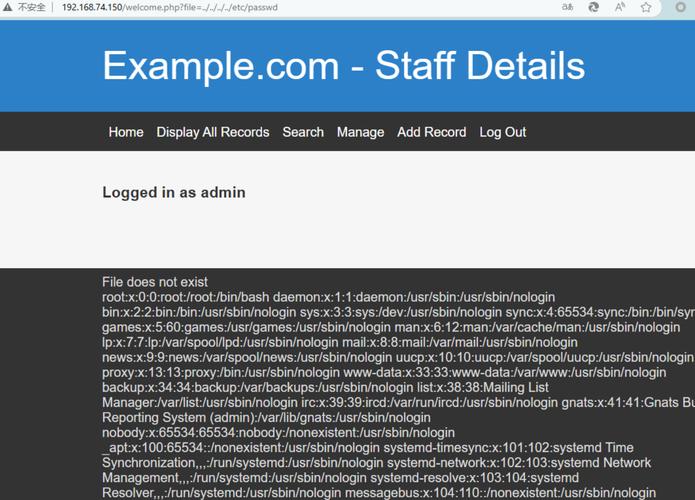
Because its entire purpose is to dynamically execute arbitrary PHP code based on parameters passed via a URL, it can be exploited by an attacker.
Common Attack Vectors:
-
URL Manipulation (Parameter Injection): An attacker doesn't need access to your admin panel. They can simply craft a malicious URL and try to execute it directly in their browser or via automated scripts.
- Example: A vulnerable
run.phpmight blindly execute a file name passed in thepluginparameter.http://your-site.com/dede/plugins/run.php?plugin=../../../uploads/shell.phpIf the server is not properly configured, this could trick the script into executing a malicious PHP file (a "webshell") that an attacker has uploaded to youruploadsdirectory.
- Example: A vulnerable
-
Lack of Authentication/Authorization: In some older or poorly configured DedeCMS versions,
run.phpmight not properly check if the user making the request is actually logged in as an administrator. An attacker could exploit this to run plugin actions without credentials. -
Insecure Plugin Code: Even if
run.phpis secure, if a plugin itself has a vulnerability in its action files (e.g.,execute.php),run.phpwill happily execute that vulnerable code.
Real-World Consequences of Exploitation:
- Website Defacement: The attacker can change the content of your website.
- Data Theft: They can steal sensitive data from your database, including user information, content, and admin credentials.
- Malware Distribution: They can use your server to host and distribute malware or phishing sites.
- Server Compromise: In the worst-case scenario, they can gain full control over your server.
Best Practices and Mitigation
If you are a DedeCMS website owner or developer, you must take these steps to secure run.php and your site.
For Website Owners:
- Upgrade Immediately: The most important step. Ensure you are running the latest stable version of DedeCMS. The official developers are aware of these vulnerabilities and have patched them in recent versions. The patched versions include proper checks for file paths, user authentication, and parameter validation.
- Use Strong Credentials: Use a very strong, unique username and password for your admin panel. Enable two-factor authentication (2FA) if your hosting or DedeCMS version supports it.
- File Permissions: Set strict file permissions. The
/dede/directory and its contents should not be writable by the web server (e.g.,chmod 755orchmod 750). - Use a Web Application Firewall (WAF): A WAF can block malicious requests before they ever reach
run.php. It can detect and block common attack patterns like SQL injection and directory traversal attempts in the URL. - Regular Audits: Regularly scan your website for malware and vulnerabilities.
For Developers (If you must modify or create plugins):
-
Sanitize All Inputs: Never trust any data from the URL (
$_GET), forms ($_POST), or cookies. Use functions likepreg_replace()with a strict whitelist of allowed characters to sanitize all parameters.- Bad:
$pluginName = $_GET['plugin']; - Good:
$pluginName = preg_replace('/[^a-z0-9\_\-]/i', '', $_GET['plugin']);
- Bad:
-
Validate File Paths: Before including or executing a file, ensure the path is exactly where it should be and not trying to traverse outside the plugin directory.
$pluginName = $_GET['plugin']; $action = $_GET['action']; // Define the absolute base path for plugins $pluginBaseDir = DEDEROOT . '/plugins/'; // Construct the full, safe path $filePath = $pluginBaseDir . $pluginName . '/' . $action . '.php'; // CRITICAL: Verify the path is within the allowed directory if (strpos(realpath($filePath), realpath($pluginBaseDir)) !== 0) { die('Invalid path.'); } if (file_exists($filePath)) { require_once($filePath); } else { die('Action file not found.'); } -
Check User Permissions: Before executing any action, verify that the current user is logged in and has the necessary rights.
if ($cuser->loginCount == 1) { exit('You have not logged in.'); } if ($cuser->groupid != 1) { // 1 is usually the superadmin group exit('You do not have permission.'); } -
Principle of Least Privilege: The web server user (e.g.,
www-data,apache) should have the absolute minimum permissions required to run the website. It should not have permission to write to the filesystem outside of designated directories like/uploads/(and even then, with caution).
Summary
| Aspect | Description |
|---|---|
| What it is | A core DedeCMS backend file that executes dynamic plugin actions. |
| Function | It acts as a controller, loading and running PHP code from specific plugin files based on URL parameters. |
| Security Risk | High. It's a prime target for attackers because it can execute arbitrary code if not properly secured. |
| Main Threat | URL manipulation (parameter injection) to run unauthorized scripts (webshells). |
| Solution | Upgrade to the latest DedeCMS version, use strong admin credentials, set proper file permissions, and consider using a WAF. |


