


格式化字符串
无论是 printf 还是 scanf,它们都依赖于一个格式化字符串,这个字符串包含了两种类型的字符:

(图片来源网络,侵删)
- 普通字符:这些字符会原样输出(
printf)或作为输入时的分隔符(scanf)。 - 格式说明符:以百分号 开头,后面跟一个或多个字符,用于指定如何转换和打印/读取一个特定类型的数据。
格式化输出:printf 函数
printf 函数用于将格式化数据输出到标准输出(通常是屏幕)。
基本语法
int printf(const char *format, ...);
format:格式化字符串。- 可变参数列表,数量和类型必须与格式化字符串中的格式说明符一一对应。
- 返回值:成功打印的字符数,失败则返回负数。
常用格式说明符
| 格式说明符 | 数据类型 | 描述 | 示例 |
|---|---|---|---|
%d 或 %i |
int |
以十进制形式输出一个整数。 | printf("%d", 123); |
%c |
char |
输出一个字符。 | printf("%c", 'A'); |
%s |
char* |
输出一个字符串(以 \0 结尾的字符数组)。 |
printf("%s", "Hello"); |
%f |
double |
以小数形式输出一个浮点数。 | printf("%f", 3.14); |
%lf |
double |
scanf 中用于读取 double 类型,printf 中 %f 和 %lf 效果一样。 |
printf("%lf", 3.14); |
%e 或 %E |
double |
以科学计数法(指数形式)输出浮点数。 | printf("%e", 314.0); // 输出 140000e+02 |
%g 或 %G |
double |
自动选择 %f 或 %e 中更紧凑的一种形式。 |
printf("%g", 1000.0); // 输出 1000 |
%p |
void* |
输出一个指针的地址。 | printf("%p", &my_var); |
| - | 输出一个百分号 本身。 | printf("100%%"); |
修饰符
可以在 和字母之间添加修饰符来更精确地控制输出格式。
- 宽度:指定最小输出字段宽度,如果内容不足,默认用空格填充。
%5d:printf("%5d", 10);// 输出10(右对齐,总宽度5)%-5d:printf("%-5d", 10);// 输出10(左对齐)
- 精度:对于浮点数,指定小数点后的位数;对于字符串,指定最大打印字符数。
%.2f:printf("%.2f", 3.14159);// 输出14%.5s:printf("%.5s", "Hello World");// 输出Hello
- 标志
- 对于有符号数,总是显示正负号。
printf("%+d", 10);//+10 ` (空格):正数前加空格,负数前加负号。printf("% d", 10); 10`- 对于
o(八进制),x(十六进制),f/e/g(浮点数),显示特定的前缀或小数点。printf("%#x", 255);//0xff
- 对于有符号数,总是显示正负号。
示例代码
#include <stdio.h>
int main() {
    int age = 25;
    char name[] = "Alice";
    double height = 1.68;
    int score = 95;
    // 基本用法
    printf("Name: %s\n", name);
    printf("Age: %d\n", age);
    printf("Height: %.2f meters\n", height); // 精度修饰符
    // 带宽度和对齐
    printf("|%10d| (右对齐,宽度10)\n", score);
    printf("|%-10d| (左对齐,宽度10)\n", score);
    // 带标志
    printf("Score with sign: %+d\n", score);
    // 输出百分号
    printf("You scored 100%% in the exam.\n");
    return 0;
}
输出结果:
Name: Alice
Age: 25
Height: 1.68 meters
|        95| (右对齐,宽度10)
|95        | (左对齐,宽度10)
Score with sign: +95
You scored 100% in the exam.格式化输入:scanf 函数
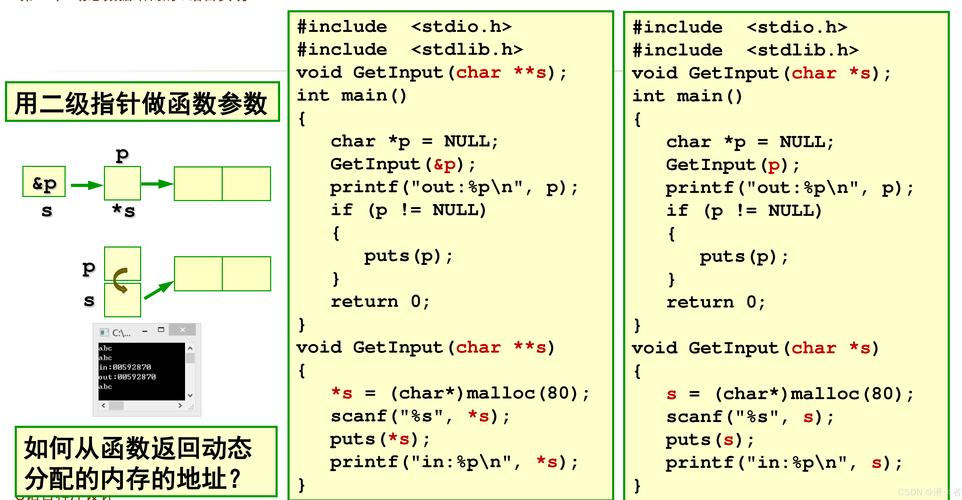
scanf 函数用于从标准输入(通常是键盘)读取格式化数据。
(图片来源网络,侵删)
基本语法
int scanf(const char *format, ...);
format:格式化字符串。- 可变参数列表,必须是变量的地址(使用
&运算符获取)。 - 返回值:成功匹配并赋值的字段数量,如果读取失败(如遇到文件结尾或非预期字符),则返回
EOF。
常用格式说明符
scanf 的格式说明符与 printf 类似,但用途是读取。
| 格式说明符 | 对应的变量类型 | 描述 |
|---|---|---|
%d |
int * |
读取一个十进制整数。 |
%c |
char * |
读取一个字符。注意:会读取包括空格和换行符在内的所有字符。 |
%s |
char * |
读取一个字符串,直到遇到空白字符(空格、制表符、换行符)。 |
%f |
float * |
读取一个单精度浮点数。 |
%lf |
double * |
非常重要:读取一个双精度浮点数时,必须使用 %lf。 |
%lf |
double * |
scanf 中必须用 %lf 读取 double 类型。 |
关键注意事项
-
变量地址:
scanf的参数必须是变量的地址,忘记使用&是一个非常常见的错误。int num; scanf("%d", num); // 错误! scanf("%d", &num); // 正确! -
%s和缓冲区:%s读取字符串时,会在末尾自动添加\0,你必须确保提供的字符数组足够大,以防止缓冲区溢出,最好指定读取的最大宽度。char name[50]; scanf("%s", name); // 有风险,如果输入超过49个字符就会溢出。 scanf("%49s", name); // 更安全,最多读取49个字符,留1位给'\0'。 -
%c和空白字符:%c会读取输入流中的下一个字符,无论它是什么(包括空格和换行符),如果你想在读取一个字符串后读取一个字符,需要先“消耗掉”换行符。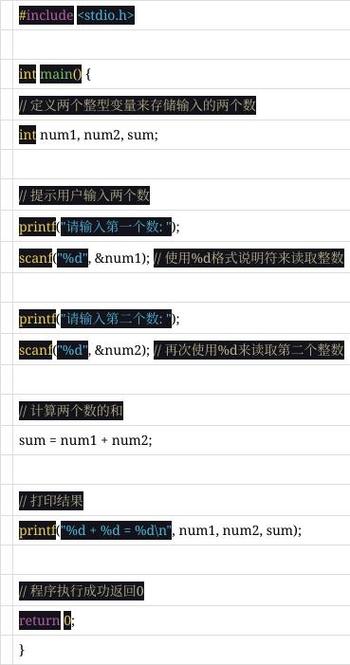 (图片来源网络,侵删)
char first_name[20], last_initial; printf("Enter your first name: "); scanf("%s", first_name); // 假设输入 "John" // 输入缓冲区中还剩下一个换行符 '\n' printf("Enter your last initial: "); scanf("%c", &last_initial); // 这会直接读取 '\n',而不是用户输入的字母 // 正确的做法是: // printf("Enter your first name: "); // scanf("%s", first_name); // scanf(" %c", &last_initial); // 在 %c 前加一个空格,告诉 scanf 跳过所有空白字符
示例代码
#include <stdio.h>
int main() {
    int id;
    char product[50];
    float price;
    printf("Enter product ID, name, and price (e.g., 101 Apple 1.99): ");
    // scanf 返回成功读取的项目数
    int items_read = scanf("%d %49s %f", &id, product, &price);
    if (items_read == 3) {
        printf("\n--- Product Details ---\n");
        printf("ID: %d\n", id);
        printf("Name: %s\n", product);
        printf("Price: $%.2f\n", price);
    } else {
        printf("Error: Invalid input format.\n");
    }
    return 0;
}
交互示例:
Enter product ID, name, and price (e.g., 101 Apple 1.99): 102 Banana 0.59
--- Product Details ---
ID: 102
Name: Banana
Price: $0.59
其他相关函数
除了 printf 和 scanf,还有其他一些格式化函数:
fprintf:向指定的文件流(FILE*)写入格式化数据。FILE *fp = fopen("output.txt", "w"); fprintf(fp, "User: %s, Score: %d\n", "Bob", 88); fclose(fp);fscanf:从指定的文件流(FILE*)读取格式化数据。sprintf:将格式化数据写入一个字符串缓冲区,而不是屏幕。char message[100]; int x = 10, y = 20; sprintf(message, "The sum of %d and %d is %d.", x, y, x + y); // message 现在是 "The sum of 10 and 20 is 30."
sscanf:从一个字符串中读取格式化数据。char data[] = "ID: 123, Name: Charlie"; int user_id; char user_name[50]; sscanf(data, "ID: %d, Name: %49s", &user_id, user_name); // user_id 是 123, user_name 是 "Charlie"
| 函数 | 功能 | 关键点 |
|---|---|---|
printf |
格式化输出到屏幕 | 使用 开头的格式说明符,支持各种修饰符(宽度、精度、标志)来美化输出。 |
scanf |
格式化输入从键盘 | 必须使用变量地址 (&)。%lf 用于读取 double,注意处理空白字符和缓冲区溢出问题。 |
fprintf/fscanf |
格式化输入/输出到文件 | 第一个参数是文件指针 (FILE*)。 |
sprintf/sscanf |
格式化写入/读取字符串 | sprintf 将格式化数据存入字符串,sscanf 从字符串解析数据。 |
掌握 printf 和 scanf 的格式化功能是 C 语言编程的基础,它能让你精确地控制数据的显示和输入,是构建交互式程序的关键。


